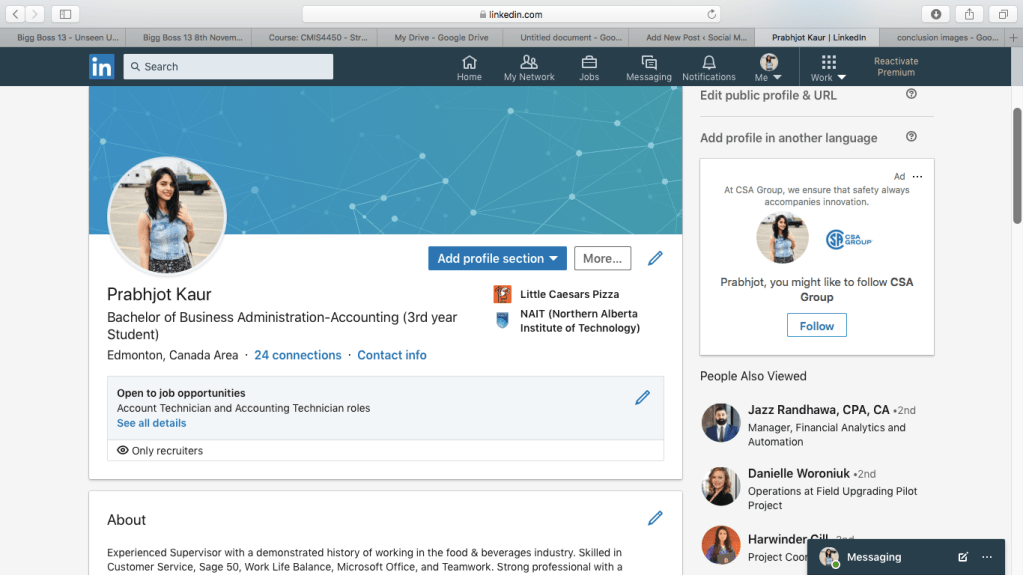
LinkedIn is a great platform for people to connect with the business world especially with recruiters. In this Video by Oliver Schinken (2018), we got to learn about the importance of LinkedIn and how students can create their LinkedIn profile to seek more career opportunities.

Steps in Creating a Profile

1) Sign up first if not using it. 2) Add a photo and background- To help to profile to stand out – Click camera icon- choose pic – edit (zoom in or out) – Option for filters and quality – apply – Option to change it anytime we want – Use a recent picture – Consider proper framing – Quality of picture- no blurry pics – Professional pic – Customize Background
3) Personalize your Headline – Customize it -reflect message that you want to convey. – Define who you are and what you are trying to achieve.
4) Add a Summary – Put a lot of time and though in it – Opportunity to share your experience, your abilities, add key words Following is the summary of qualification from my Resume

ABOUT ME I am an enthusiastic, self-motivated, reliable, responsible and a hardworking individual. I am a mature team worker and can adapt to all challenging situations. I am able to work well both in a team environment as well as using own initiative. I am able to work well under pressure. I have an active and dynamic approach to work and getting things done. I am determined, decisive, and I identify and develop opportunities.
5) Education – In this step add your college or university name using the drop down menu to get the logo along with the name. – Mention about the time you were in college along with extra curricular activities and clubs you were in.
6) Add Work and Volunteer Work This is your space to write down your work experience along with the responsibilities that you have performed in both full time and part time jobs.
7)Add Skills, Endorsement, and Recommendations – Make list of skills that you possess – more than 5 skills, better chance of getting jobs – public speaking, technical skills – at least 5-10 different skills – ask people to be your referrals for endorsements.
8) Configure your public profile Configure and customize your profile URL.
Build Your Network

What LinkedIn Empowers you to do – Access recent articles and posts relevant to you – Create a strong digital footprint – Build a strong professional network – Research companies and industries – Find and apply for jobs
Oliver Schinken has demonstrated some tips and tricks to build a LinkedIn network. This section involves five subsections which are as follows:
1) Create a professional network-employee referrals and social professional networks are two most common ways any company hire people.
2) Connect with people- “you get what you give”. Connect with people and add personalized messages in your connection request.
3) Improve your LinkedIn search- filters can be used for advance searches and narrow it down. filtered by place, by people, current companies, keywords and so on.
4) The Alumni tool- University pages are a good way of connecting to people from the same colleges.
5) LinkedIn group- these are trusted communities to build means for connections, a great way to customize your feed.
Using LinkedIn Day-to-Day
News feed – it can be customized, it also makes recommendations based on your career and activity on your profile. Use this feed to learn more about mews, trends, and fields you are involved in or interested in.
Follow companies and influencers – follow companies that you are interested in and in this way their posts will show up in your news feed. This can also be done with people by just choosing them to follow, you don’t need to connect with them. It is a great way to remain up to date with the industry.
Digital Footprint- “Your digital footprint is your personal brand”. Make it positive
- Convey a strong professional image
- Personality fits with company culture
- Well rounded
- Wide range of interest
Share Update and content and publish articles- “a chance to get your name out there”. Share what you find interesting with your network. Oliver Schinken has provided some examples of how to share stuff on your timeline.
Send and Receive Messages- tool/option to talk to your connections. It has a chat like message format option.
Job Search and Company Research
Explore Potential career and companies- looking for potential jobs as on LinkedIn there is :
- Over 500 million members
- Over 9 million companies
- Over 10 million active job postings
- 92% recruiters use LinkedIn to recruit
Company insights – It is a tool to look at any company insights which can be useful for analysis if you want to know more about a company before applying for a position there. Filters can be used to dig deeper to find out something about a company, such as its growth.
Manage Your LinkedIn Account
You have the option to make your account a premium that gives some benefits. A basic account which is free is still a good tool. You can consider a free trial of premium account. For students it is not that viable as you have to pay for it. This section also includes privacy settings and how to manage your account. Data of your account can be downloaded if you choose to delete your account someday.
Conclusion

Overall this video course taught us the importance of LinkedIn profile and how students can make best out of it to enhance their career. I have my own LinkedIn account but that is very basic and is mostly at default settings. I got to learn a lot about how I can improve my profile and make it reach out to people or companies that I want to work with in the future.
Keeping an updated LinkedIn profile is very crucial in today’s fast paced business environment. If any student is introvert in nature and does not go out to networking events, it will be harder for that student even if he gets a higher GPA in his studies. Nowadays, most companies hire new talent through referrals and networking events. Thus LinkedIn is an important tool especially for students to present themselves in front of future employers.
Reference
Schinken, O. (2018, March 14). Learning LinkedIn for students. Retrieved from: https://www.linkedin.com/learning/learning-linkedin-for-students/welcome?u=2109516
 Social Media Marketing