In the Video, “Advertising on Facebook” by Megan Adams, we get to learn some basic tips and tricks that are important to advertise on Facebook. She started her video by sharing some common pitfalls, which are necessary to save time and money. First of all it is important to know why you are advertising, for what product and then learn how to create and craft a strategy for your advertisement. Sponsored ads are a part of paid promotion. Facebook Ad is a powerful tool when it is being used in alignment with your business’s market goal and strategy (Adams, 2019). A beginner needs to learn how to create ads that make sense and reach out to the intended audience. Primary objective is to drive traffic to the landing page.
Overview
Facebook is a great way to with your customers where they are already active and engaged. Facebook ads manager is a tool that helps in setting up your account and managing it afterwards. It is easy to create your account and also prices are very flexible. First of all, you need to find your goal of advertising- is it to promote an online store? You want people to install your app? And you just want to increase your likes and comments on your page? Then define your budget and finally decide how you want to pay for those ads. Learn from others, look at what other advertisers are doing.
Why facebook?
There are many reason to choose Facebook platform to advertise. few of those reasons are as follows:
A) Number of Users: Facebook has over 2.37 billion users, thus making this a huge platform for people to market their products or a news. Facebook has users of all ages from baby boomers to Millennials.
B) Price: Facebook provide flexible price for advertisers as there are options to choose or set a budget that you want to spend on a monthly basis.
C) Easy to Use: Facebook is a huge platform as it has over 2.37 billion users, which make it easier for businesses to reach out to these prospective customers. It is very easy to manage your account and use tools to handle take full advantage of this service.
How Facebook ads work?
It is important to learn how these ads work, Adams (2019), has mentioned about ad guides in her video. According to her ad guide outlines different ad types, their purpose and even shows how these ads look. There are three main section on this Facebook page which are as follows:
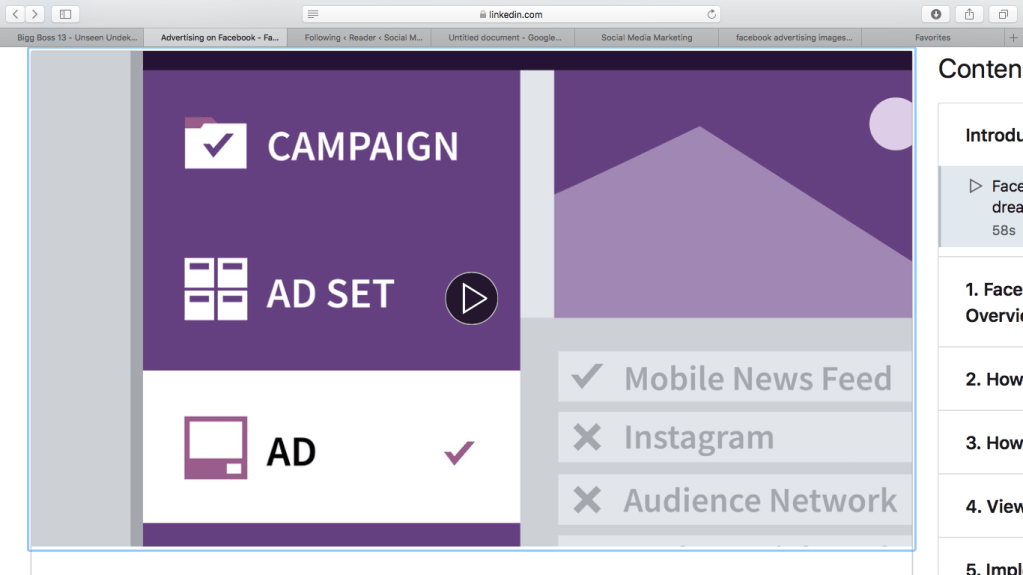
1) Campaign– It defines your primary objective. Which can be further described as follows:
- Awareness -Brand awareness and Reach
- Consideration – traffic, engagement, app installs, video views (facebook pixel- tracks number of visitors)
- Conversion– conversions, catalog sales, store traffic
2) Ad Set– determine the audience and placement of ads, who are you targeting? There are option to choose from your target audience. It is crucial to select your appropriate audience.
3)Ad – This section includes creating the ads itself, which can have images, text, videos, links to another websites etc.
Target Ads on Facebook
On Facebook, there are a lot of options to select your targets for your advertisement. Facebook collects a lot of information from its users that is then used to target audience in various ways. Some factors are involved in it which are described as follows:
- Locations for business- Cities, countries, and neighbourhoods
- Demographics- Age, gender, education
- Interests- hobbies, or pages liked on fb
- Behavior- purchase habits, device used or recent life events
- Connections-Reach people connected to your page, applications, friends
- Custom audience- use a customer contract list, your website traffic, or activity from your app
- Sharing a customized add to existing users just upselling
How to create Facebook Ads
There are few different sections which were described in the video by Adams (2019), which are as follows:
A) How to set up an account: This section includes setting up a basic account first and then navigating through all settings.
- Add Credit card for payment
- Business name and add location of a country
- Clarify Ad agency or working on behalf of anyone else
- Facebook billing- payment methods, cap at spending to control ad cost
- Email Notification -helpful if you are new user
- Could be most difficult to set up account
B) Identify your Audience: Before advertising about your products, it is necessary to select your target audience first. Set up age, gender, location, language, and there is limited options to select cities but selecting a country is mandatory. There are two main type of audience which are described in the video.
- Highly relevant audience
- Target Intended audience
Refine your audience with interest targeting
Refine your audience with behaviour targeting, which includes– demographics, shopping habits, travel, additional behaviour option to select from.
Choose a budget for your ads
Start small in the beginning– There is budget option under the tools to manage and control your budget.
Cost control option- This is an option to control cost and there is info icon to get more information about cost controlling.
Budgeting and Scheduling- There is an option to set budget and schedule spending with the options of daily and lifetime spending budget.
View Your Advertising Data
Creating advertising reports
- Reporting section- Under report section you can export table data as an excel file, can choose create reports option and also can compare attributes window.
- Understand your success metrics, and do a comparison between different campaign using different factors. Tips for writing a great ad
- a clear call to actions- make it easy for audience (adding weblink)
- Use simple, eye catching images
- have someone else review your ad
- test and run multiple variations
Implement Best Practices
How to choose an effective image for your ad: Following are some of the tips mentioned in the video by Adams, (2019):
- Try stock photography -pixle.com, unsplash.com are possible options
- use images featuring people and bright colors
- consider how the image will look when the size is reduced
- test your images- discover which images your audience would prefer and work best
- don’t underestimate the power and importance of the right image
Improve the performance of your ads
- Are they relevant? Target interest, behaviour, demographics
- Create a landing page-are you sending people to a specific page?
- Analyze reporting data- get familiar with your cost per click, impressions, and reach.
- Target specific device users- mobile friendly Are your ads running too often? Keep refreshing and improving
Conclusion
Overall, in this video by Adams, we got to learn about the usefulness of advertising on Facebook. The speaker talked about basics to teach his listeners about how to setting up your account and then went in dept about managing your account and some basic policies & procedures. Personally, i found some interesting ads over the years on my facebook page, although i never bought anything after getting influenced by those ads.
However, I find it interesting that how people especially the businesses are using social media such as Facebook to advertise their products or business as facebook is meant for people to connect with their friends worldwide. Eventually, i got to learn a lot about how i can use a social media site to advertise.
Reference
Adams, M. (2019). Advertising on Facebook. Retrieved from https://www.linkedin.com/learning/advertising-on-facebook-2/facebook-is-an-advertiser-s-dream?u=2109516
 Social Media Marketing